



One in Five Searches: How SEOs Recover Clicks Lost to AI Overviews
AI Overviews can reduce clicks for many queries, and the first move is checking your generative AI performance report in Search Console. The evidence shows fewer clicks on traditional results when a summary appears, so the priority is clear: confirm crawlability, tighten your summary content, and measure before reacting.
Phenyx
phenyx.co
Strengthen Your Search Visibility
Phenyx combines SEO, web design, content, and branding to help growing businesses build a clearer, more consistent online presence.
Table of Contents
What Are AI Overviews and When Does Google Show Them?
AI Overviews are the generated summary blocks that appear above traditional blue links on a Google results page, built to answer a query directly rather than send searchers to a single site. We see them most often on longer, question-shaped searches where the intent is informational rather than transactional.
Google tends to trigger these summaries for queries that benefit from synthesis: comparisons, multi-part questions, “how” and “why” searches, and topics where no single page fully answers the question. A typical overview includes a few sentences of synthesized text, a handful of linked sources, and sometimes images or a short list.
For working SEOs, the practical takeaway is pattern recognition. Overviews show up unevenly across query types, so auditing your own site’s top queries in Google Search Central’s AI features documentation is a faster path to clarity than guessing.
Common traits of the queries that trigger overviews:
How Does Google Build AI Overviews?
Google generates these summaries using a large language model grounded in web content, drawing on multiple sources at once rather than paraphrasing a single page. Grounding means the model pulls supporting text from pages it can crawl and index, then cites a selection of them alongside the generated answer.
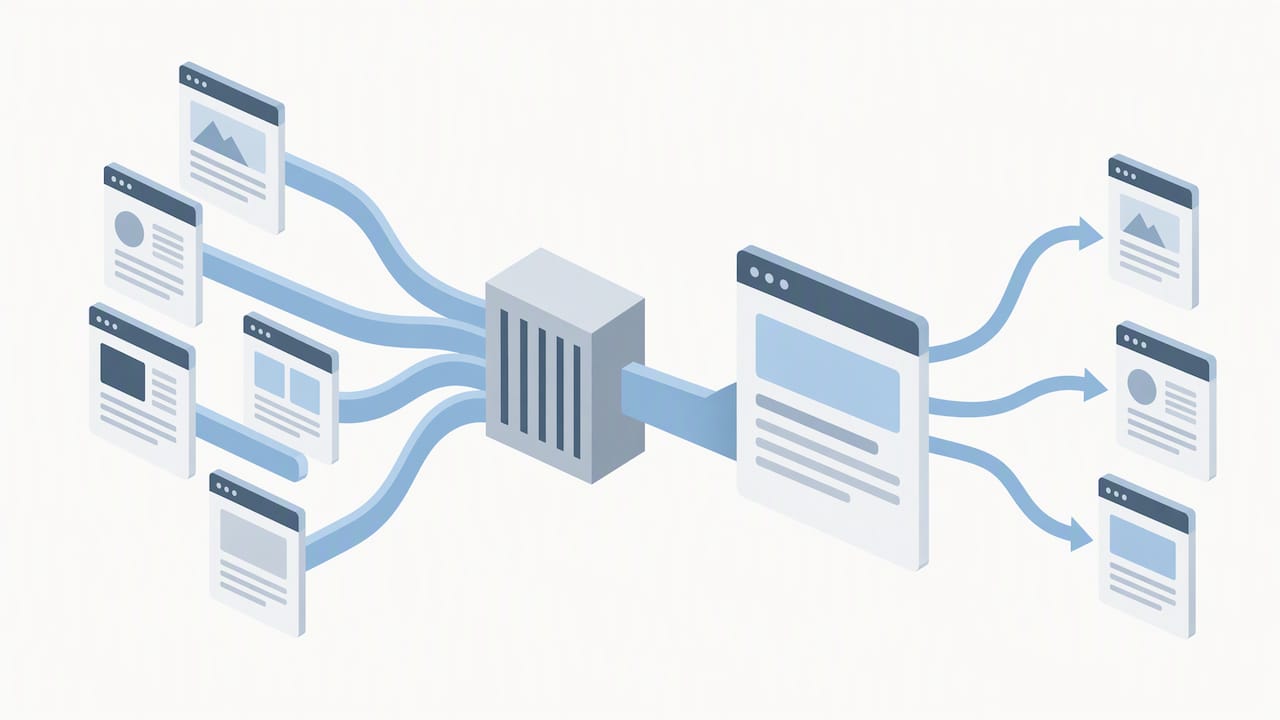
Citations and link previews matter here because they signal which sources the system treated as reliable enough to reference. A page that is well-structured, factually specific, and easy to parse has a better shot at being pulled into that grounding process than a page full of vague, generic claims.
That said, the system is not flawless. Hallucinations still happen, meaning the generated text can state something no source actually says, and citation behavior can be partial: a page might contribute to the answer without ever appearing as a visible citation.
One in five searches in a recent sample produced an AI Overview, according to Pew Research Center’s analysis, a scale that makes grounding behavior a mainstream SEO concern instead of a fringe case.
What tends to improve grounding odds:
Why AI Overviews Matter for Clicks and Traffic
The click data is the part that should worry anyone managing organic traffic. Pew Research Center found that searchers click a traditional result link just 8% of the time when an AI summary appears, compared with 15% when it does not. Even more striking, only about 1% of AI Overviews produced a click on one of the cited sources themselves.
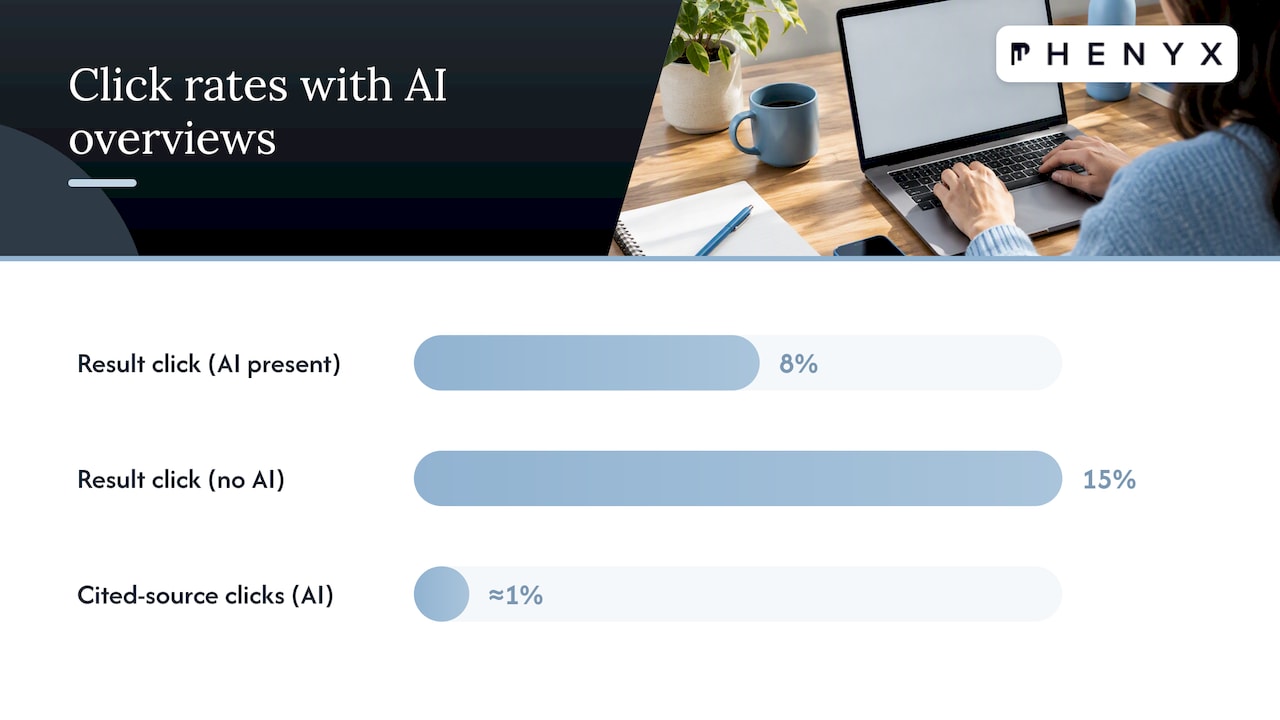
Ars Technica’s reporting on the same research summarized the effect as cutting website clicks by almost half for affected queries, while noting that AI Overviews now appear in a notable share of searches in the sample studied.
That drop does not hit every page the same way. A few patterns worth tracking:
The business risk is not that traffic disappears everywhere. It is that the queries driving top-of-funnel awareness, often the ones agencies report on most proudly, are the ones most likely to get summarized and never clicked.
How to Appear in AI Overviews: An Optimization Checklist
Getting cited starts with the basics working correctly, then layers in content and authority signals that make a page easy for a model to extract and trust.
For a deeper walkthrough of how we approach generative-search optimization project by project, our practical GEO playbook breaks down the tactics we prioritize first.
Pro Tip: Start with your five highest-impression, lowest-CTR pages in Search Console. Those are the pages most likely already feeding an AI Overview without earning you a click.
How Do You Control AI Overviews in Search Console?
Google gives site owners two tools that matter most here. The first is the Search generative AI control, which lets you include or exclude your content from generative AI features. The setting defaults to include, and excluding a site removes it from generative features without affecting how it’s indexed elsewhere in Search.
The second is the generative AI performance report inside Search Console, which shows impressions tied specifically to AI features, broken down by page, country, device, and date.
Control or reportWhat it doesWhy it matters for triageSearch generative AI controlIncludes or excludes a site from generative AI featuresLets you test removal on underperforming pages without affecting regular indexingGenerative AI performance reportShows impressions by page, country, device, and dateReveals which pages are feeding overviews without driving clicksRegular Search Performance reportShows clicks, impressions, and CTR for standard resultsGives the baseline to compare against generative-specific data
Practical steps worth building into a monthly routine:
How Should You Measure the Impact of AI Overviews?
A clean measurement framework keeps this from turning into guesswork. We recommend tracking four numbers consistently across any site affected by generative features.
Run experiments in pairs when possible: change one variable (a summary paragraph, a header structure, a citation style) on a test set of pages and leave a comparable set untouched. Expect attribution to stay imperfect. Generative AI performance data and standard Search Performance data do not always reconcile cleanly, so treat both as directional rather than exact. For more on why ranking and visibility data can look inconsistent across tools, see our piece on ranking volatility and what different teams actually see.
What Are the Risks, and How Do You Mitigate Them?
Hallucinations are the most immediate risk: an AI Overview can state something inaccurate about your brand, product, or industry, sourced loosely or not at all from your actual content. Copyright exposure and misinformation are close behind, especially when summaries paraphrase proprietary data without clear attribution.
Practical mitigation steps:
Pro Tip: Treat hallucination monitoring like a lightweight brand-mention alert, not a one-time audit. New summaries can surface weeks after a page goes live.
How We Approach AEO Reporting for Clients
We built generative metrics directly into client dashboards rather than treating them as a side report, because impressions from AI features need to sit next to standard clicks and conversions to mean anything.
Our process for prioritizing remediation follows a consistent structure, without relying on a single rigid template:
This kind of structured review keeps testing consistent across a client’s full page set, instead of reacting page by page as isolated issues come up.
Our Take: Rethink What Success Looks Like
Clicks were never the real goal, conversions and qualified attention were. Agencies that keep reporting raw traffic as the primary win will struggle to explain a CTR drop that coincides with stable or improving lead quality.
The better move is running small, documented pilots on a handful of pages, then letting the data decide what scales. Transparency about what AI Overviews can and cannot be controlled builds more client trust than overpromising a quick fix.
Get Help Adapting Your SEO to AI Overviews
We help marketing teams turn this shift into a testable plan instead of a guessing game. Our SEO & AEO services start with an audit of which pages are losing clicks to generative features and which ones are strong candidates for citation-ready rewrites.

Because our website design, content, and reporting work come from the same team, changes to page structure, speed, or summary content move faster than they would across separate vendors. For teams exploring AI visibility in a specific category, our SBA lender and CDC audit shows how we structure a focused review.
What this looks like in practice:
If you want a clear read on where your pages stand, request a free SEO & AEO audit and we’ll walk you through what we find.
FAQ
Is there an AI tool for SEO?
Yes, several platforms now build AI directly into keyword research, content drafting, and technical audits, and Google’s own Search Console includes a generative AI performance report built for this purpose. The right tool depends on whether you need content support, technical analysis, or reporting on generative visibility specifically.
What is the 80/20 rule in SEO?
It’s a general principle suggesting that a small share of pages or efforts tends to drive most of the results, so teams prioritize high-impact pages rather than spreading effort evenly. Applied to AI Overviews, that often means focusing first on pages with high generative impressions and falling click-through rates.
How do you do SEO for AI search?
Start with crawlability and indexability, then write concise, directly worded summary paragraphs near the top of key pages and support them with clear sourcing, as explained in the Role of AI in Search Rankings. Checking the generative AI performance report regularly helps confirm whether those changes are translating into citations.
What is AI SEO called now?
The emerging term is often AEO, short for answer engine optimization, or sometimes GEO, for generative engine optimization, both describing the practice of optimizing content to appear in AI-generated answers rather than only traditional rankings. Definitions are still settling as the field matures.
How do you opt out of AI Overviews?
Site owners can use the Search generative AI control in Search Console to exclude their content from generative AI features. Excluding a site removes it from those features specifically but does not affect how the page is indexed or ranked in standard search results.

